technology
EHR Data Integration: Seamless, Standards-Based Data Exchange with EHR Systems

Paweł Kozera
Core insight
EHR data integration works by connecting your app to an EHR through APIs - most often FHIR - so the two systems can exchange patient data securely. Under the hood that means agreeing on an interoperability standard (FHIR or HL7 v2), authenticating access with OAuth 2.0 and SMART on FHIR, mapping fields between systems that rarely line up exactly, and handling errors when a sync fails. This article walks through how EHR data integration actually fits together in practice.
How EHR data integration works, step by step
You've decided to connect your product to an EHR, and you've picked an approach: middleware, direct vendor APIs, or a custom build. The step before it - what EHR integration is, why it's hard, and how to choose between building and buying - is covered in our EHR Software Integrations guide. Here we stay on one question: once you're building, how does an EHR integration actually work?
At a technical level, every EHR integration comes down to four moving parts:
APIs - the endpoints an EHR exposes (usually FHIR) that let your app read and write patient data.
Standards - HL7 v2 and FHIR, which define how that data is formatted so both systems agree on what they’re exchanging.
Secure access - authentication and authorization (OAuth 2.0, SMART on FHIR, SSO) that prove who is asking and what they’re allowed to touch.
Data exchange - reading records out, writing updates back, and reconciling the two so nothing drifts out of sync.
The rest of this article walks through each of these, plus the two parts teams routinely underestimate: mapping data between systems that rarely match exactly, and handling errors when a sync fails.
Which standard you’ll use: FHIR and HL7 v2
Most integrations rely on two standards, and many use both at once. FHIR (Fast Healthcare Interoperability Resources) is the modern choice, built on REST and JSON, and it’s the logical starting point for new API work - especially for mobile and web apps. HL7 v2 is older but still carries a large share of hospital messaging, particularly for labs and admissions. Which one you actually call depends on the source system: you might pull demographics through a FHIR API while receiving lab results as HL7 v2 messages, because that’s how the system publishes them. For the full comparison of when each applies, see the EHR Software Integrations guide. In practice, plan for both.
Leveraging EHR APIs for real-time syncing
APIs are the engines of integration - they let your app read and write EHR data in real time. Most major vendors, including Epic, Oracle Health, and athenahealth, expose FHIR-based APIs. Common calls look like:
GET /Patient/{id} - retrieve patient demographics
POST /Observation - submit new lab results or vitals
PATCH /Appointment - update scheduling information
That real-time exchange lets your app display current medications before a virtual consult, push completed pre-visit forms into the EHR, and notify providers about patient-reported symptoms.
Pro tip: check whether your vendor supports Bulk FHIR Export if you’re building population-health features.
Authentication and Single Sign-On (SSO)
Single Sign-On lets clinicians use one set of credentials across both the EHR and your integrated app, which removes repeated logins and speeds adoption. Modern EHR integrations authenticate through OAuth 2.0, usually via SMART on FHIR, which authorizes your app to launch inside the clinician’s workflow and access only the data it’s cleared for. The payoffs:
Unified login across systems
Fewer login errors and less friction
Faster user adoption and onboarding
Consent and role-based access control (RBAC)
To access patient data securely and legally, your app needs two controls working together:
Explicit patient consent - logged and documented
Role-based access control (RBAC) - access limited by user role
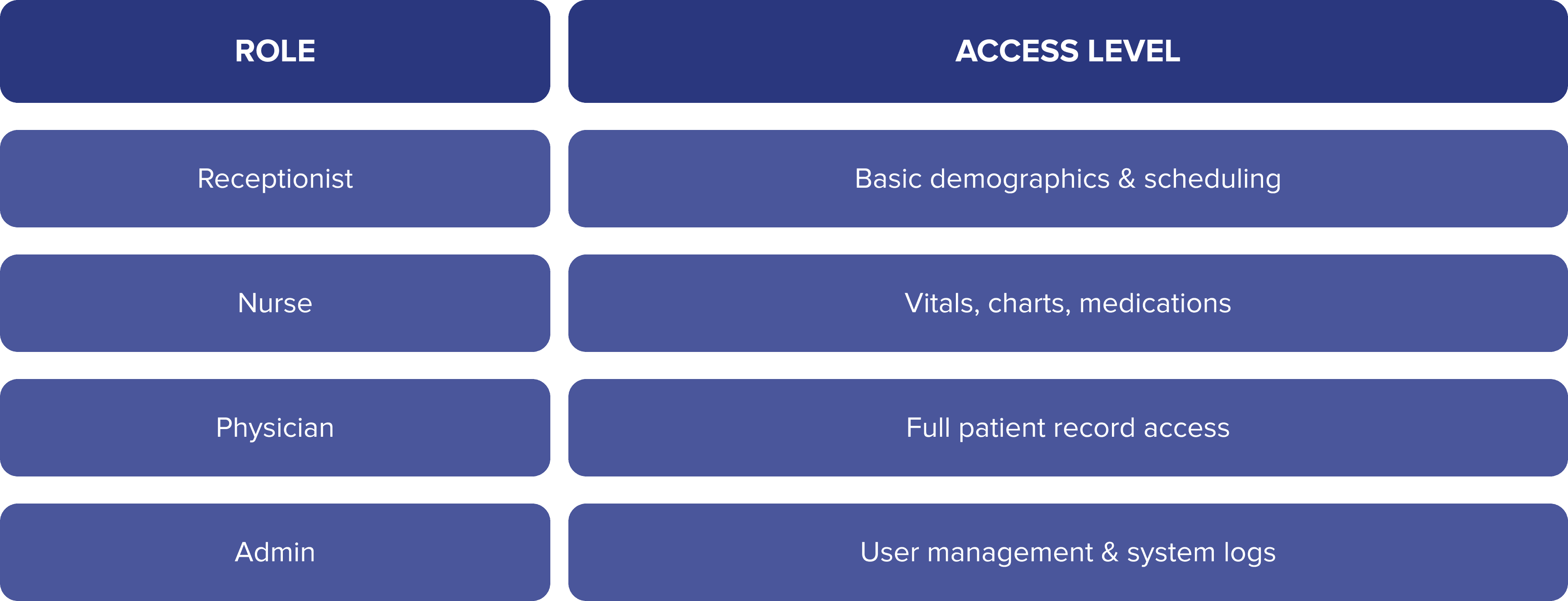
Complying with the HIPAA Security Rule means audit trails, encryption, and controlled data access on top of those. For the deeper security layer - encryption, data protection, and privacy design - see our guide on security and privacy of user data in healthcare.
Data mapping and normalization
EHRs use different formats, naming conventions, and coding systems, so mapping and normalization keep data consistent as it moves between them. The usual friction points:
ICD-10 vs SNOMED coding systems
Units of measurement (e.g., mg/dL vs mmol/L)
Varying date/time formats
Pro tip: lean on standardized terminologies - LOINC for labs, RxNorm for medications.
Error handling and integration logging
No integration runs clean forever, so error handling and logging aren’t optional. Log at least:
Timestamps of every sync attempt
API responses (success/failure)
Error codes and diagnostics
Which records transferred or were rejected
Those logs speed up troubleshooting and double as evidence for compliance audits.
Working with vendors on EHR data integration
EHR vendors typically have their own rules, sandbox environments, and documentation. Engaging early with them ensures smooth integration.
Integration Checklist:
✅ Request sandbox/test environment access
✅ Review API rate limits and security policies
✅ Confirm the authentication method (OAuth 2.0, SMART on FHIR)
✅ Clarify consent-flow requirements
Pro tip: platform programs like Epic’s developer program or Oracle Health’s developer APIs offer vendor-specific guidance.
Final thoughts: future-proofing EHR data integrations
EHR integration nowadays is an absolute strategic necessity. As healthcare becomes more data-driven, apps that use standards like FHIR and build on secure APIs will be best positioned for:
Scalable growth
Enhanced patient outcomes
Cross-platform interoperability
By prioritizing seamless, standards-based integration, your healthcare app becomes a trusted part of the care continuum. For further guidance, consult the 21st Century Cures Act and the ONC Interoperability Roadmap.
Paweł Kozera
Marketing Specialist
Explore more



Let's stay in touch!